
Contributing
Run the gate first
make check
Every step must be green (the check target in Makefile is the single source of truth for the list). To run one step on its own:
bash tests/run.sh                   # tests
./shellkit docs --check             # generated artefacts are current
bash tools/check_versions.sh        # version references agree
bash tools/check_docs.sh            # documented examples still hold
bash tools/check_module_order.sh    # module order and dependency declarations
bash tools/check_exitcode_docs.sh   # public functions document return codes
bash tools/check_local_names.sh     # out-parameter reserved names
bash tools/check_pipe_safety.sh     # early-exit consumers (SIGPIPE + pipefail)
bash tools/check_security.sh        # paths/symlinks/permissions/redaction/locks/atomic writes
bash tools/api_baseline.sh          # API behaviour baseline and Stable promises
make bats-check, make coverage, make mutation and make bench stay out of make check: they need external tools (bats) or run the suite several times over, so CI has dedicated jobs/steps.
Adding a module means three edits; miss one and the gate goes red
- Write
lib/core/<name>.sh: every public function must be preceded by a comment on the line directly above (docs-checkblocks otherwise), and it must document its return code (check-exitcode-docsblocks otherwise). - Add one line to
lib/modules.txt-- the single source of truth for the module list:lib/bootstrap.shloads from it,tools/shdoc.shgenerates the API reference from it, the site syncs from it. Two columns: the module name, then the modules it depends on (space separated, optional). Put it in dependency order, not alphabetical order; a missing dependency declaration or a wrong order makesmodule-order-checkname the offending call directly. - Write
tests/test_<name>.sh: thetests/test_*.shglob executes it automatically.
Functions marked @internal are not exported and are exempt from the comment-coverage check; internal functions whose names start with an underscore (_sk_*) are exempt as well.
Changing an existing function needs its own version
Within 0.x we only add, never change. When a change alters results (return code, output file name, output text):
- give it a version of its own (say 0.6.0 → 0.7.0);
- add a "behaviour changes that alter results" table to
docs/MIGRATING.md; - state the old behaviour, the new behaviour, and what callers must do.
Additive changes can ship as a patch.
Releasing
make release-dry VERSION=x.y.z
make release VERSION=x.y.z
The first is a dry run: bump the version → regenerate pot and docs → sync version references in the site → run the gate → restore the working tree. The second really ships: commit, tag, push, and the tag triggers the release workflow.
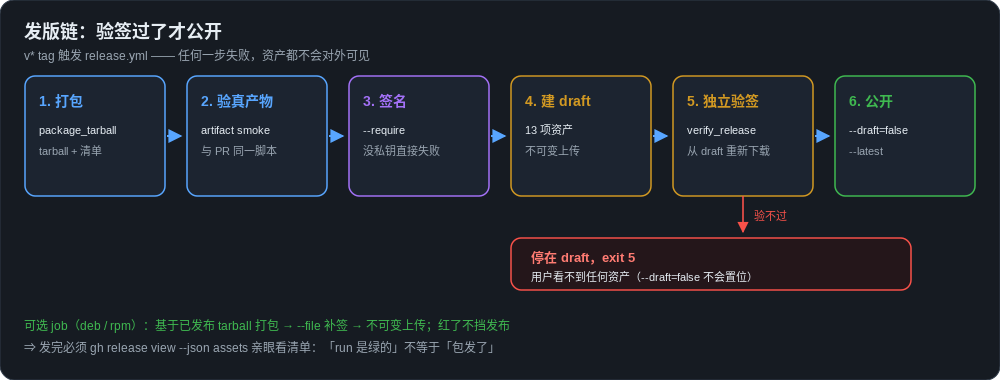
Details in Releasing.
Documentation
| What you changed | What to run |
|---|---|
| a public function's comment | ./shellkit docs (regenerates REFERENCE and the three AI artefacts) |
| a message id | bash po/messages.sh |
| a site page | cd site && npm run build (which syncs docs/ first) |
| an example in the README | nothing by hand; check-docs verifies it |
docs/ is the single source of truth: the site's Cookbook, migration, release and API reference pages are generated from docs/ by tools/site_sync.sh. Do not edit those pages inside site/ -- the next build overwrites them.
Commits
- One commit, one change. Do not mix a bug fix with a docs edit.
- Write the message as why, not what -- the diff already says what.
- For a behaviour change that needs proving, paste the real command and its output into the commit body or PR.