
Install and upgrade
Three ways to install. Pick one: a single command, a local checkout, or an offline internal mirror.
Secure install (three steps, recommended)
sha256 proves the download was not altered; it does not prove who published it -- the checksum list and the archive travel the same channel, so both can be replaced together. High-assurance environments use these three steps (the default curl | bash path still works, see below):
# 1) Check the public key: docs/TRUST.md pins this base64, and it must match
#    shellkit.minisign.pub from the release (or the raw TRUST.md at the same tag).
#    RWQSCu8f5lvakshhMkZ2zgn+hbB0s0EJ2Wpx+rUgfHw7MmcQ5gcmPBao

# 2) Verify offline, before executing anything
#    Requires minisign: brew install minisign / apt-get install -y minisign
VERSION=1.8.0
base="https://github.com/yi-nology/shellkit/releases/download/v$VERSION"
work=$(mktemp -d) && cd "$work" || exit 1
for f in "shellkit-$VERSION.tar.gz" install.sh SHA256SUMS shellkit.minisign.pub; do
  curl -fsSLO "$base/$f" || exit 1
  case "$f" in *.pub) ;; *) curl -fsSLO "$base/$f.minisig" || exit 1 ;; esac
done
minisign -Vm "shellkit-$VERSION.tar.gz" -p shellkit.minisign.pub
minisign -Vm install.sh -p shellkit.minisign.pub
minisign -Vm SHA256SUMS -p shellkit.minisign.pub
sha256sum -c SHA256SUMS            # macOS: shasum -a 256 -c SHA256SUMS

# 3) Install from the verified, checksum-clean tree (no more downloads)
tar -xzf "shellkit-$VERSION.tar.gz" && cd "shellkit-$VERSION" || exit 1
./install.sh --prefix "$HOME/.local"
The other key channels, verifying install.sh itself (offline path), and the deb/rpm trust chain are in docs/TRUST.md.
One command
curl -fsSL https://github.com/yi-nology/shellkit/releases/latest/download/install.sh | bash
The default prefix is /usr/local; if it is not writable, the installer falls back to ~/.local.
The script itself never writes a file into the target directory. It only does four things:
- Resolve the latest version (the
releases/latestredirect). - Download
shellkit-<version>.tar.gzandSHA256SUMS. - Verify sha256 -- a mismatch exits 5 and not a single byte is written.
- Unpack the archive and hand over to the bundled
shellkit install-self.
The install logic exists exactly once, inside install-self. The bootstrap script merely downloads it -- otherwise "one-click install" and "manual install" would eventually produce two different layouts.
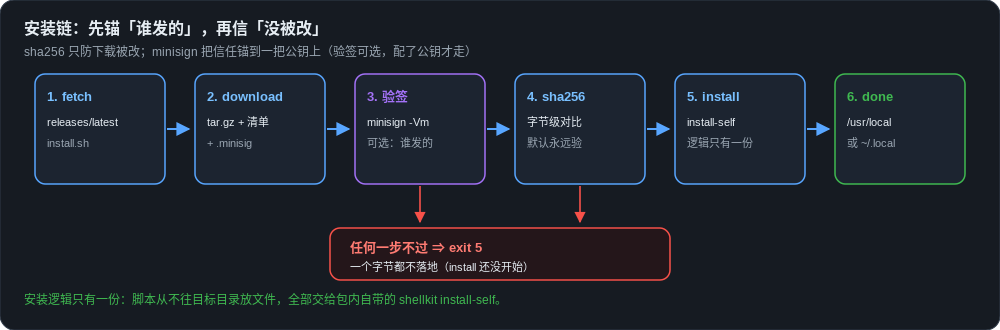
With a public key configured (SHELLKIT_MINISIGN_PUBKEY or SHELLKIT_MINISIGN_PUBKEY_FILE), the script verifies SHA256SUMS.minisig and the tarball's .minisig before reading the checksum list. The full procedure, including offline verification, lives in TRUST. Without a key the step is skipped and the default behaviour is unchanged.
The URL is a release asset, never raw.githubusercontent.com. The latter gets reset on some networks, and the repository path is fixed anyway, so neither the website nor the README uses raw.
Homebrew
brew install yi-nology/shellkit/shellkit
The tap lives in yi-nology/homebrew-shellkit. The formula is a generated artefact: tools/brew_formula.sh in the upstream repository produces it, and its sha256 comes from the release SHA256SUMS -- Homebrew requires a byte-exact match, so a hand-copied checksum is always wrong.
Try it without installing (one command)
curl -fsSL https://github.com/yi-nology/shellkit/releases/latest/download/demo.sh | bash
It downloads the release, verifies the sha256, unpacks into a temporary directory, generates a project, runs that project's own tests (on the real binary) and prints a short tour. Nothing is installed on your machine; the temporary directory is removed when the process exits, and only the demo project remains.
Pin a version, change the prefix, use a mirror
# change the install prefix
curl -fsSL https://github.com/yi-nology/shellkit/releases/latest/download/install.sh | PREFIX="$HOME/.local" bash

# pin a version
curl -fsSL https://github.com/yi-nology/shellkit/releases/latest/download/install.sh | VERSION=1.8.0 bash

# internal mirror: <base>/v<version>/<asset>
curl -fsSL https://github.com/yi-nology/shellkit/releases/latest/download/install.sh | SHELLKIT_RELEASE_BASE=https://mirror.example/shellkit bash
The mirror must be laid out as <base>/v<version>/shellkit-<version>.tar.gz. Even a local mirror built with file:// has to live under the v<version>/ subdirectory, or the download fails.
Install the working tree from a checkout
When you have cloned the repository and want the current code, not a release:
./shellkit install-self
./shellkit install-self --prefix "$HOME/.local"
install.sh --prefix DIR is equivalent to unpacking first and then calling install-self.
Update
shellkit update --check
shellkit update
--check only compares versions, and stdout carries the version number and nothing else, so it pipes straight into scripts:
latest=$(shellkit update --check)
if [ "$latest" != "$(cat VERSION)" ]; then
  log_warn "new version available: $latest"
fi
update downloads, verifies sha256, and only then replaces anything. Offline or behind a firewall, hand it a local archive:
shellkit update --from shellkit-1.8.0.tar.gz --sha256 "$SUM"
Uninstall
shellkit uninstall-self            # remove only our files whose content is still original
shellkit uninstall-self --purge    # also remove files the user added (works after a normal uninstall)
shellkit uninstall-self --legacy   # explicit legacy cleanup for old installs without fingerprints
Installation records every file it actually wrote, with fingerprints, in PREFIX/share/shellkit/.shellkit-install-manifest. Uninstall compares each entry, skips anything containing ../ with a warning, and keeps user-edited or user-added files (kept files that are not ours: N). Without a manifest a normal uninstall fails with exit code 3 and leaves the decision to a human -- guessing is the fastest way to delete somebody else's files. Old installs that only have MANIFEST (no fingerprints) fail closed by default: run install-self --force to adopt fingerprints (this overwrites local edits) and then uninstall, or use --legacy to explicitly delete every file listed in the old manifest.
What landed where
PREFIX/bin/shellkit                  entry point
PREFIX/share/shellkit/lib/           the library (bootstrap.sh + core/*.sh)
PREFIX/share/shellkit/locale/        translations
PREFIX/share/shellkit/templates/     templates used by shellkit new
PREFIX/share/shellkit/tests/         assertions and runner (an installed copy can test itself)
PREFIX/share/shellkit/MANIFEST       the installed-file ledger
PREFIX/share/shellkit/.shellkit-install-manifest  ownership fingerprints (uninstall/reinstall baseline)
Exit codes
| Code | When |
|---|---|
| 0 | Installed |
| 2 | Bad arguments (for example --prefix with no value) |
| 3 | Precondition unmet (no write permission, PREFIX is a file rather than a directory) |
| 4 | Download failed |
| 5 | Verification failed (sha256 mismatch, corrupt archive) |
shellkit update uses the same five codes, so callers can branch on them directly.