
Thirty seconds
Generate a project, look at what it contains, add one subcommand of your own.
Try one command first
Not installed yet, and not sure you want it? One command runs a real project:
curl -fsSL https://github.com/yi-nology/shellkit/releases/latest/download/demo.sh | bash
It installs nothing on your machine: it downloads the release, verifies the sha256, unpacks into a temporary directory, generates a project, runs that project's own tests and prints a short tour. The temporary directory is removed when the process exits.
Run it
git clone https://github.com/yi-nology/shellkit.git
cd shellkit
./shellkit doctor
./shellkit new /tmp/shellkit-demo --cmd start --cmd status
cd /tmp/shellkit-demo && make test
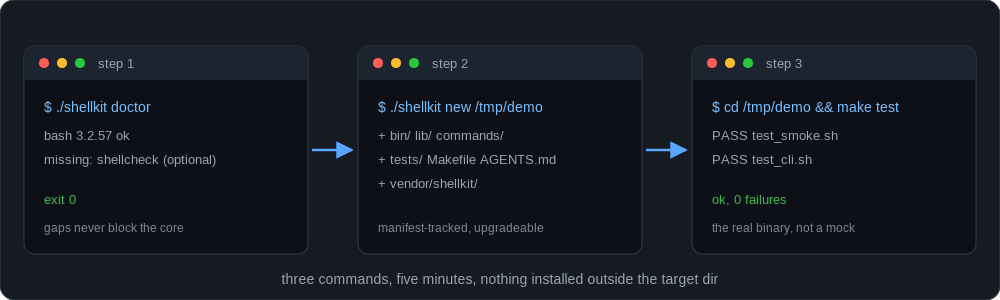
doctor runs three kinds of checks: the environment (which tools are missing), library integrity (are the module files all there, and is any of them broken) and vendor drift (does the copy inside your project still match the bundled one byte for byte).
Missing tools never block the core library -- the library has zero runtime dependencies; the affected checks are simply skipped. But a broken library or a drifted vendor copy is caught and returns 5 (verification failed): the first names the missing module, the second names the drifted file. --dir DIR points it at a project directory.
A project generated by new passes make test immediately. It is not an empty skeleton.
What was generated
shellkit-demo/
|-- bin/shellkit-demo      entry point: locate self → load library and app → cli_run
|-- lib/app.sh             assembly layer: config path + loads commands/*.sh
|-- commands/start.sh      one file per subcommand, a single cli_cmd line registers itself
|-- commands/status.sh
|-- config.example
|-- tests/run.sh           per-file runner
|-- tests/test_helper.sh   assertion library
|-- tests/test_smoke.sh    smoke test
|-- vendor/shellkit/       the library copy that travels with the project
|-- Makefile               test / lint / fmt
|-- AGENTS.md              constraints for AI: banned syntax, task-to-module map, self-check list
`-- .shellcheckrc
vendor/ is deliberate: the project carries its own copy of the library, so CI does not need shellkit installed and "somebody upgraded the system shellkit last week" cannot silently change what the build produces.
Add a subcommand
Copy commands/start.sh under a new name, then change the function name and the trailing cli_cmd line:
cp commands/start.sh commands/deploy.sh
The new file looks like this (with the real logic elided):
cmd_deploy() {
  local __target __force=""

  cli_opt_init
  cli_opt __force --force -f
  cli_opt __target --target -t 1
  cli_opts "$@" || return $?

  if [ -z "$__target" ]; then
    __target=$(conf_get TARGET "localhost")
  fi
  log_info "deploying $__target"
  return "$SK_OK"
}

cli_cmd deploy "deploy the service" "deploy [--force] [--target HOST]"
The dispatcher never changes: cli_run finds cmd_<name> dynamically through declare -F, and hyphens in the command name are translated too (install-self → cmd_install_self).
cli_cmd must be the last line of the file: registration happens when the file is sourced, so an early call registers a function that does not exist yet.
Adopt it in an existing project
You do not have to rewrite anything first. One command mirrors the library in:
cd /path/to/your-project
shellkit vendor .
shellkit vendor . --check
vendor syncs lib/, locale/, templates/, tests/, VERSION and the CLI itself into vendor/shellkit; --check compares byte by byte and returns 5 on drift, which is exactly what you want in CI to catch "somebody edited vendor locally".
The copy carries its own CLI and templates, so a project moved to a machine without shellkit installed can still upgrade itself, offline:
./vendor/shellkit/shellkit upgrade .
One line at the top of your script wires it up:
. "$(cd "$(dirname "$0")/.." && pwd)/vendor/shellkit/lib/bootstrap.sh"
Only want the testing capability for now? Copy tests/run.sh and tests/test_helper.sh across. Zero dependencies.
Then work through Five-step migration. Every step can ship on its own.